




Exploring Best Features Of Android 11 Google has launched the third developer preview of its Android 11 version (just to remind the first Android 11 developer preview came in Feb and the second one came in March). Today we’ll explore some of the feature’s Android Mobile App Development has to offer in this developer review 3 and we can expect them in the final stable launch of Android 11. Important note, this is purely a developer preview and not a public beta, hence, it’s only available to download on Pixel phones and to install these updates you need to go through the process of flashing your phone. 1. Native Screen Recording: One of the important and easy to use feature some Android phones already have is the screen recording. In the drop-down setting shade, you see the screen recording option. Tapping this option, you’ll see a confirmation pop-up, selecting this will start the screen recording and will capture whatever you are doing on the phone. You can cancel the recording the anytime. 2. Message Bubbles: Like how Facebook Messenger’s chat heads work, Mobile App Development has also introduced a notification in the form of Floating bubble when you receive a message through the regular messages app. To enable this, just long-press a message notification and tap “show in a bubble”, and now you get your bubbles – any new messages will popup up as a window from this bubble. 3. Redesigned Notifications: One cool new feature in Android 11 is sorting of notifications into relevant groups. Hence, Android App Developers develop an operating system in which conversations will appear at the top in their own easy to read section, making it easier to quickly reply and carry on with your tasks. Adding some extra finesse, there’s also an element of transparency and gradients added to the recent update. 4. Back Gesture Sensitivity: The back gesture could be little annoying at times when it’s used to perform multiple similar tasks. Thankfully, Android 11 empowers you with two sliders, one each on the left and right side of the screen, to control the sensitivity of the ack gesture. 5. Single Time App Permissions: Google has always been known for enhanced security. With Android 11, Google has probably launched the biggest privacy-based feature. Single time app permission lets you tell an app it can only access your location just that one time you’re using the app, rather having to choose between ‘all the time’, ‘only when I’m using it’ or ‘never’. 6. Scheduling Dark Theme: Android 11 is reported to have the ability of scheduling when your device shifts to dark mode. You can either set a custom time or like so many apps and other Android phones you can also choose to have it come on at sunset and switch off at sunrise. 7. Pin Apps To Top Of Share Sheet: Finally, in Android 11 you’ll be able to pin apps and shortcuts to the Share Menu. This feature briefly appeared in the Android 10 build cycle but never made it to final release. But now it’s back and hopefully, this time the feature will remain. Pixel Values Technolabs is one of the top Mobile App Development Company providing Digital Marketing services to the clients worldwide along with the mobile and web app development services. 8. Muting Notifications During Video: I am sure it’s annoying to receive notification when you are capturing a memorable moment with your loved ones. With Android 11, you can mute the notification while recording the videos. Pixel Values Technolabs is one of the top Mobile App Development Company providing Digital Marketing services to the clients worldwide along with the mobile and web app development services. 9. Auto Revoke App Permissions: If you think you are not going to use an app after few months, then you can automatically revoke permissions such as camera, location, and more, from such apps. 10. Undoing Recently Cleared Apps: If you happen to accidentally clear an application, then now you can undo the same by quickly swiping down on the screen. There are many more subtle devices specific and Mobile App Developer focused changes which are published in Android developer review 3. We are expecting that many more features will come-up in the future Developer Previews which will happen between now and the Stable Android 11 launch. SO STAY TUNED!! Author Bio: Tauseef Anwar is the CEO of Pixel Values Technolabs, The Best Mobile App Development Company In India. Tauseef believes in making customer satisfaction as the top most priority and takes care of the Business Development and operations. An entrepreneur by heart, he is always ready to speak a few words or discuss the latest tech especially if it is mobile technology. Contact Information: Call us at 0712-6611379 OR 9822367795 Skype: Pixel_values Website: www.pixelvalues.com
Read MoreBLog
Benefits Of AngularJS, A Web Application Development Solution
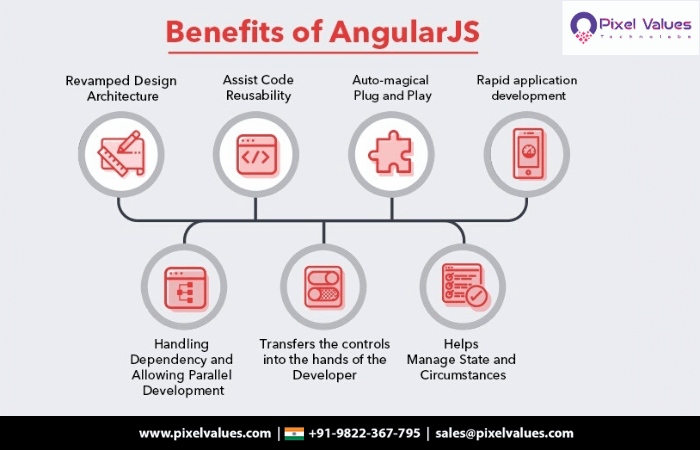
Benefits Of AngularJS, A Web Application Development Solution The success and life of any great technical product majorly depends on the technology used to develop it. Safety, Availability, Community Support, Scalability, Ease of Use etc. are few of the parameters which come in mind while selecting the technology to develop any product. Hence, selecting the right Web Application Development framework from the available alternatives is very important in such a competitive world. When we look at the research and in-depth market analysis, AngularJS, a JavaScript framework originally created by Google, has gained a commendable respect and applauds from Web App Developers and businesses community due to the broad spectrum of features and impressive benefits it offers.The ‘’Angular way of doing things’’ let’s developer choose the best-known solution and not just any solution that works. Overall idea of AngularJS is to offer important components, patterns and development practices in a single framework which is easy to use and follows best Web Application Development Services and practices. Hence, to attain this purpose AngularJS supports components such as models, views, controllers and services. While developing AngularJS test community was also kept mind and hence, AngularJS supports writing test friendly code which leads to a high-quality software. Angular also supports well the use of jQuery library, which ensures that many of the popular web development practices can be used as before. AngularJS Journey So Far 1. Easy To Learn And Adapt: AngularJS framework is built on top of JavaScript and HTML which are already old technology stacks, hence, the learning curve for the developers is easy 2. Robust Security: Though the framework being developed by Google, the earlier version of Angular, Angular 1, had security loopholes. However, with subsequent upgrades this has been resolved and now AngularJS applications can be saved from XSRF/CSRF, hijacking, and other vulnerabilities. 3. Third-Party Integration: On top of the existing readymade solutions, AngularJS also offers the ease to integrate with third-party applications, tools, plug-ins smoothly. 4. Less Coding: AngularJS empowers the developers to reuse the code from the application developed by them earlier let’s developer code less. Also features many components that don’t require the developer to code, thus resulting is lesser coding effort. 5. Real-Time Testing: AngularJS allows to perform module wise unit testing by loading only the required module that needs to be tested. 6. Large Community Support: Considering the benefits offered by this open source Mobile And Web App Development framework, there are many businesses and developers who are using this and hence, AngularJS has a huge community support who helps in the development and maintenance of this framework with their valuable contributions. Benefits Of Development On AngularJS 1. Faster Development: As AngularJS supports MVC architecture, it saves lot of time in development, testing and maintenance. MVC coupled with dependency handling allows developers to take the advantage of parallel development. Thus, helping in faster development and saving lot of time. 2. Better Performance: AngularJS comes along with a lot of in-built optimization tools that helps in speeding up the app. Also, by following the specific optimization tips provided by AngularJS, apps can improve the performance. 3. Easy to Plug & Play: With the plug & play feature that AngularJS offers, Web Developers can simply copy / paste the feature without needing to write even a single line of code. 4. Developer Friendly: Directives which come along with AngularJS allows developers to experiment whatever they want to build, test, reiterate, injecting object or anything. This developer friendly approach allows liberty to the developers to create more responsive and dynamic websites that stay up to date with modern trends and user’s expectations. CONCLUSION: Undoubtedly, the way Google has managed the evolution of AngularJS framework over the time makes it worth the investment and time of developers and businesses. Many differentiating features, security, ease of development, great UI etc. makes it definitely one of the Best development framework worth your attention. Author Bio: Tauseef Anwar is the CEO of Pixel Values Technolabs, The Best Mobile App Development Company In India. Tauseef believes in making customer satisfaction as the top most priority and takes care of the Business Development and operations. An entrepreneur by heart, he is always ready to speak a few words or discuss the latest tech especially if it is mobile technology. Contact Information: Call us at 0712-6611379 OR 9822367795 Skype: Pixel_values Website: www.pixelvalues.com
Read More